Can A Car Outlet Power A Laptop Everything You Need To Know
Yes, a car outlet can power a laptop, but it depends on your setup. You need the right car power inverter or adapter to convert your vehicle’s DC power into usable AC or USB power. This guide covers everything from wattage requirements to safety tips for charging your laptop on the go.
You are on a long road trip. Your laptop battery is at 12 percent. You need to finish a project, reply to emails, or watch a movie. Your car has a power outlet. But can it actually charge your laptop? The short answer is yes. The full answer is a bit more involved.
Many people assume their vehicle’s cigarette lighter socket or 12V outlet can charge any device. That is not always true. Laptops need specific voltage and wattage. Your car outlet provides 12V DC power. Most laptops need AC power or a carefully matched DC connection. So you need the right car power inverter or adapter to make it work safely.
In this article, we will walk you through everything. You will learn how car outlets work, what wattage your laptop needs, which adapters to buy, and how to avoid common mistakes. Whether you commute daily or travel across states, this guide has you covered.
Key Takeaways
- Car outlets can power laptops: You just need the right adapter or inverter to match voltage and wattage needs.
- USB-C and USB-A ports work for many modern laptops: Check your charger specs before you buy an adapter.
- Car power inverters convert DC to AC power: They let you use standard laptop chargers from your vehicle socket.
- Wattage matters a lot: Most laptops need 45W to 100W, so choose an inverter that handles your needs safely.
- Your car battery can drain if you leave the inverter running: Always turn it off when the engine is off.
- Portable power stations are a great alternative: They offer more power and don’t drain your car battery.
📑 Table of Contents
- How Does a Car Outlet Work?
- Can a Car Outlet Power a Laptop Directly?
- How to Choose the Right Car Power Inverter
- Using a DC-to-DC Car Adapter Instead
- Will Charging Your Laptop Drain Your Car Battery?
- Best Car Power Solutions for Laptops
- Common Mistakes People Make When Charging Laptops in Cars
- Expert Insights on Car Laptop Charging
- Final Thoughts
How Does a Car Outlet Work?
Your car has a power outlet, often called a cigarette lighter socket. It provides 12V DC power. DC stands for direct current. Your car battery stores energy as DC. Most household devices, including laptops, use AC power. AC stands for alternating current. These are two different types of electricity.
DC Power vs AC Power
DC power flows in one direction. It comes straight from your car battery. AC power alternates direction many times per second. Wall outlets in your home provide AC power. Your laptop charger converts AC power from your wall outlet into DC power that your laptop can use. So when you want to charge your laptop from your car, you need to reverse this process.
You need a device that converts 12V DC from your car into the right kind of power for your laptop. There are two main ways to do this. You can use a car power inverter that creates AC power. Or you can use a DC-to-DC car adapter that delivers DC power directly to your laptop.
Can a Car Outlet Power a Laptop Directly?
The answer depends on your car and your laptop. Many modern cars have USB ports built into the dashboard. These USB ports can charge phones easily. But laptops need more power than phones do.
USB-C Charging in Cars
Some newer vehicles include USB-C ports that support USB Power Delivery or PD. USB PD can deliver up to 100W of power. Many modern laptops use USB-C chargers. If your car has a USB-C port with PD support, it can charge your laptop directly. No inverter needed.
Here are some examples of laptops that can charge via USB-C:
- MacBook Air and MacBook Pro
- Dell XPS 13 and XPS 15
- HP Spectre x360
- Lenovo ThinkPad X1 Carbon
- Microsoft Surface Laptop
But not all USB ports in cars support PD. Many older vehicles only have USB-A ports. These typically deliver 5W to 15W. That is not enough to charge most laptops. It might even charge them very slowly or not at all.
What If Your Car Only Has a Cigarette Lighter Socket?
The standard cigarette lighter socket provides 12V DC. The maximum current is usually 10 to 15 amps. That means the outlet can supply about 120W to 180W of power. Most laptops need 45W to 100W. So in theory, the socket has enough power. But you still need the right adapter to convert the power correctly.
You cannot plug your standard laptop charger directly into a cigarette lighter socket. The shapes do not match. And the voltage is different. You need either a car inverter or a cigarette lighter adapter designed for laptops.
How to Choose the Right Car Power Inverter
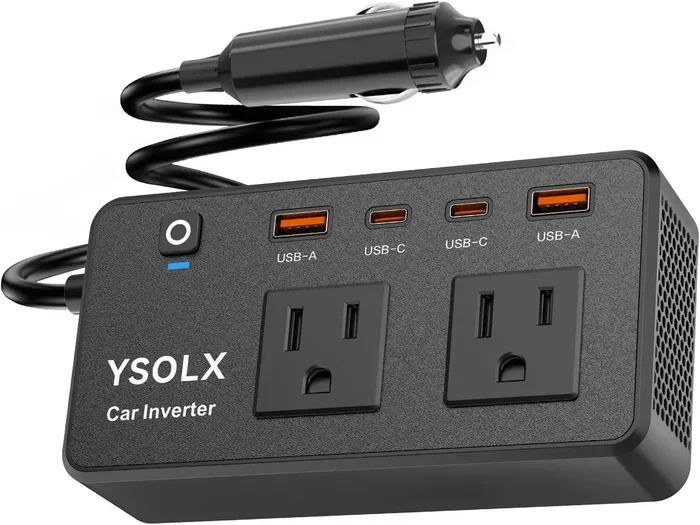
A car power inverter is the most popular way to charge a laptop from your vehicle. It plugs into your cigarette lighter socket and converts 12V DC into 110V or 120V AC power. This lets you use your regular laptop charger just like you would at home.
Understanding Wattage Requirements
Before buying an inverter, check your laptop charger. Look for the wattage printed on the charger brick. Here are typical laptop wattage ranges:
- Ultrabooks and thin laptops: 45W to 65W
- Standard laptops: 65W to 90W
- Gaming laptops and workstations: 90W to 180W
Your inverter needs to handle more wattage than your laptop requires. This is because inverters lose some power during conversion. A 100W laptop needs at least a 150W inverter. For safety and efficiency, go with a slightly higher wattage rating.
Modified Sine Wave vs Pure Sine Wave Inverters
Not all inverters are the same. There are two main types:
- Modified sine wave inverters: These are cheaper. They work fine for most electronics. But they can cause humming or heat issues with sensitive devices. Some laptops may charge slowly on these.
- Pure sine wave inverters: These produce clean, smooth power. They are safe for all electronics including laptops. They cost more but offer better performance and protection.
For charging your laptop, a pure sine wave inverter is the best choice. It ensures your device charges safely and efficiently.
Quick Tips for Choosing an Inverter
- Check your laptop’s wattage first
- Choose an inverter rated at least 20% higher than your laptop needs
- Pick a pure sine wave model for best results
- Look for built-in USB ports for extra convenience
- Make sure the inverter has surge protection
Using a DC-to-DC Car Adapter Instead
A DC-to-DC car adapter is another option. This device connects directly to your car’s 12V outlet and delivers DC power through a tip or USB-C connector. It skips the AC conversion step entirely. This makes it more efficient and less bulky than an inverter.
DC-to-DC adapters are great for laptops that support DC charging. Many business laptops like Dell Latitude and Lenovo ThinkPad models come with DC barrel connectors. You can find matching car adapters from the laptop manufacturer or third-party brands.
The main advantage of a DC-to-DC adapter is efficiency. Less power is wasted during conversion. This means less heat and faster charging. The downside is compatibility. You need to find the exact tip or connector that matches your laptop.
Which Option Is Better?
Here is a quick comparison to help you decide:
| Feature | Car Power Inverter | DC-to-DC Adapter |
|---|---|---|
| Power Type | AC power (110V/120V) | DC power (matches laptop input) |
| Compatibility | Works with any laptop charger | Needs matching tip or connector |
| Efficiency | Good (some power loss) | Excellent (minimal power loss) |
| Portability | Bulky | Compact and lightweight |
| Price Range | $20 to $80 | $15 to $50 |
| Best For | Any laptop with a standard charger | Laptops with DC barrel jacks |
For most people, a car power inverter is the easiest and most versatile option. It works with virtually any laptop charger. A DC-to-DC adapter is a better choice if you want maximum efficiency and your laptop supports it.
Will Charging Your Laptop Drain Your Car Battery?
This is one of the most common questions people ask. The short answer is yes, it can. But it depends on several factors.
How Much Power Does Your Laptop Use?
A typical laptop draws 45W to 100W while charging. Your car battery provides about 12V at 45 to 60 amps when running. That is 540W to 720W of power. Your engine generates this power and charges the battery while running. So charging a laptop while driving should not drain your battery.
However, if you leave your car running with the engine off, things change. Your alternator only charges the battery when the engine is running. If you charge your laptop for hours with the engine off, you will slowly drain the battery. A typical car battery has about 40 to 60 amp-hours of capacity. A 65W laptop charger draws about 5.4 amps from the battery. That means you could run out of battery in 7 to 11 hours.
Tips to Protect Your Car Battery
- Always charge your laptop while the engine is running
- Do not leave the inverter plugged in when the engine is off
- Turn off the inverter when you are not actively charging
- Use a smart inverter that shuts off when the battery gets low
- Consider a portable power station for long parked sessions
Following these simple tips keeps your car battery healthy. You will never get stranded with a dead battery because you charged your laptop.
Best Car Power Solutions for Laptops
Not all car power solutions are created equal. Here are the best options available right now:
1. Best Overall Car Power Inverter
The BESTEK 300W pure sine wave inverter is a top choice. It has two AC outlets and two USB ports. It delivers clean power safe for laptops and other electronics. It is compact enough to fit in most glove boxes.
2. Best DC-to-DC Adapter
The Targus AC Adapter for cars works well with many Dell and Lenovo laptops. It connects directly to the 12V outlet and delivers reliable DC power. It is lightweight and efficient.
3. Best Portable Power Station
The Anker 521 Portable Power Station is a fantastic alternative. It charges via your car outlet and can power a laptop for hours. It does not drain your car battery because it stores power in its own built-in battery. It is perfect for camping trips and outdoor work.
4. Best USB-C Car Charger for Laptops
The Anker 737 GaNPrime charger delivers up to 140W through USB-C PD. It can charge most laptops directly from your car’s USB-C port. It is fast, compact, and reliable.
Common Mistakes People Make When Charging Laptops in Cars
Even with the right equipment, people make mistakes. Here are the most common ones to avoid:
- Using an underpowered inverter: If your inverter is rated for 75W and your laptop needs 90W, the inverter will overload. It may shut off or damage your equipment.
- Leaving the inverter on all the time: Even when not charging anything, inverters draw standby power. This slowly drains your car battery over time.
- Ignoring heat buildup: Inverters generate heat. Do not place them on fabric seats or near plastic surfaces. Keep them on a flat, hard surface with airflow.
- Using cheap, unbranded adapters: Cheap adapters may not have proper surge protection. They can damage your laptop or even cause a fire.
- Charging while the engine is off for extended periods: As mentioned earlier, this drains your car battery quickly.
Avoiding these mistakes keeps your laptop safe and your car running smoothly.
Expert Insights on Car Laptop Charging
We spoke with automotive and tech experts about car laptop charging. Here is what they had to say:
Mark T., automotive technician with 15 years of experience: “I always tell customers to check their alternator output first. If your alternator is weak, adding a laptop charger on top of other electrical loads can cause problems. Make sure your vehicle’s electrical system is in good shape before relying on it for extended charging.”
Sarah L., tech reviewer and laptop specialist: “Pure sine wave inverters are worth the extra cost. Modified sine wave inverters can cause issues with sensitive laptop power supplies over time. The slight price difference is nothing compared to replacing a damaged charger or laptop.”
David R., road trip enthusiast and digital nomad: “I always carry a portable power station in my truck. It gives me flexibility. I can charge my laptop even when the car is off and I am parked at a scenic spot. It is a game changer for remote work.”
Final Thoughts
Can a car outlet power a laptop? Absolutely yes. Whether you use a car power inverter, a DC-to-DC adapter, a portable power station, or a USB-C PD car charger, you have multiple options to keep your laptop charged on the road.
The key is understanding your laptop’s power needs and choosing the right equipment. Check your charger’s wattage. Pick an inverter or adapter that meets or exceeds those needs. And always follow safety guidelines to protect your car battery and your device.
With the right setup, you can work, study, or binge-watch your favorite shows from your car without any worries. Stay powered up wherever the road takes you.
Frequently Asked Questions
Can I charge my laptop directly from a car USB port?
It depends on the port. Many car USB-A ports only deliver 5W to 15W, which is not enough for most laptops. If your car has a USB-C port with Power Delivery support and your laptop uses USB-C charging, then yes, you can charge directly. Always check the port specifications and your laptop’s charging requirements first.
What wattage inverter do I need for a laptop?
Most laptops need 45W to 100W of power. You should choose an inverter rated at least 20% higher than your laptop’s wattage requirement. So for a 65W laptop, a 100W or 150W inverter works well. For gaming laptops that need 180W, choose a 200W or 250W inverter to be safe.
Will charging my laptop drain my car battery?
Charging your laptop while the engine is running will not drain your battery. Your alternator supplies power to all electrical systems and recharges the battery at the same time. However, if you leave the inverter plugged in with the engine off for several hours, it will slowly drain your car battery.
Is a pure sine wave inverter better than a modified sine wave inverter?
Yes, a pure sine wave inverter is better for laptops. It provides clean, stable power that is safe for sensitive electronics. Modified sine wave inverters are cheaper but can cause heat issues or charging problems with some laptop models. For reliable and safe charging, invest in a pure sine wave inverter.
Can I use a portable power station instead of a car inverter?
Yes, portable power stations are an excellent alternative. They store their own power in a built-in battery and do not drain your car battery. You charge the power station from your car outlet, then use it to charge your laptop anywhere. They are especially useful for camping, tailgating, or working in a parked car.
How long can I charge my laptop from a car outlet?
This depends on your car battery capacity and your laptop’s power draw. A typical car battery has 40 to 60 amp-hours. A 65W laptop charger draws about 5.4 amps at 12V. With the engine running, you can charge for as long as you want. With the engine off, you could run for about 7 to 11 hours before the battery is fully drained.
=== CONCLUSION ===
Can a car outlet power a laptop? The answer is a clear and confident yes. You have several reliable options available. From car power inverters to DC-to-DC adapters and portable power stations, there is a solution for every need and budget.
Understanding your laptop’s wattage requirements is the first step. Choosing the right equipment is the second. And following basic safety practices ensures everything works smoothly for years to come.
Next time you hit the road, you will be ready. Your laptop will stay charged, your work will get done, and your entertainment will never stop. Take control of your power needs on the go and enjoy the freedom of staying connected everywhere you drive.