Do Hidden Cameras Show Up On Wi Fi Inside Your Home
Do Hidden Cameras Show Up On Wi Fi? Yes, many hidden cameras can be detected through your Wi-Fi network if you know what to look for. Wireless spy cameras connect to your router, and you can spot them using network scanning tools, router logs, and signal detection methods. This guide walks you through everything you need to know about finding hidden cameras on your home network.
Do Hidden Cameras Show Up On Wi Fi? This is a question many homeowners ask today. With the rise of affordable wireless surveillance devices, it is natural to worry about your privacy. You might wonder if someone is watching you through a tiny camera hidden in your home. The good news is that most wireless spy cameras leave a digital footprint. They connect to your Wi-Fi network, and that connection can be traced. In this article, we will walk you through exactly how hidden cameras interact with your Wi-Fi. You will learn practical detection methods, common types of hidden cameras, and steps to protect your home. Let us dive in and take back your peace of mind.
Hidden cameras have become a real concern for families and renters alike. Whether it is a suspicious device in a rental property or a fear of being monitored by a former partner, the worry is valid. Many people assume that if a camera is small enough to hide, it must be invisible. But that is not always true. Most wireless hidden cameras need a connection to transmit data. That connection often goes through your Wi-Fi router. This means there are ways to find them if you know where to look. Understanding how these devices work is the first step toward protecting your home and family.
Key Takeaways
- Hidden cameras often connect to Wi-Fi: Most wireless spy cameras need an internet connection to stream or record footage remotely.
- Network scanners can reveal hidden devices: Tools like Fing, Advanced IP Scanner, and your router admin panel help you spot unknown devices on your network.
- Not all hidden cameras use Wi-Fi: Some use cellular data or local storage, making them harder to detect through network scanning alone.
- Physical signs matter too: Look for unusual objects, tiny holes, or strange blinking lights that may indicate a hidden camera.
- Router logs are your best friend: Checking connected device lists and bandwidth usage can expose suspicious activity on your Wi-Fi.
- Prevention is easier than detection: Securing your network with strong passwords and regular firmware updates reduces the risk of unauthorized devices.
📑 Table of Contents
- How Hidden Cameras Connect to Wi-Fi
- How to Detect Hidden Cameras on Your Wi-Fi Network
- Common Types of Wireless Hidden Cameras
- What to Do If You Find a Hidden Camera
- Preventing Hidden Cameras on Your Network
- Do All Hidden Cameras Show Up on Wi-Fi?
- Expert Insights on Hidden Camera Detection
- Key Takeaways
- Conclusion
How Hidden Cameras Connect to Wi-Fi
Do Hidden Cameras Show Up On Wi Fi? Most of the time, yes. Wireless hidden cameras work similarly to your smart home devices. They connect to your router using radio frequencies. Once connected, they can stream live video to a phone app or cloud server. Some cameras store footage on a local SD card, but many send data over the internet. This is how someone can monitor your home from miles away. The camera uses your Wi-Fi bandwidth to transmit video and audio. Even cameras that do not stream live often send periodic snapshots or motion alerts through your network.
Types of Wi-Fi Connections Used by Hidden Cameras
Not all hidden cameras connect the same way. Here are the most common connection types you will encounter:
- 2.4 GHz Wi-Fi: This is the most common frequency for wireless spy cameras. Most budget cameras use this band because it offers decent range and penetration through walls.
- 5 GHz Wi-Fi: Some higher-end hidden cameras use the 5 GHz band for faster data transfer. These cameras are a bit harder to spot because fewer devices typically use this frequency.
- Dual-Band Cameras: These cameras can switch between 2.4 GHz and 5 GHz. They offer flexibility but are still detectable on your network.
- Wi-Fi Direct: Some cameras create their own mini-network without needing a router. You connect your phone directly to the camera. These are trickier to find through network scanning.
Understanding the connection type helps you choose the right detection method. A 2.4 GHz camera is much easier to spot on your network than a Wi-Fi Direct model. If you suspect someone has placed a hidden camera, start by checking your router’s connected device list.
How to Detect Hidden Cameras on Your Wi-Fi Network
Finding a hidden camera on your Wi-Fi is more straightforward than you might think. You do not need expensive equipment to start. Several free tools and simple steps can help you identify unauthorized devices. Here is a step-by-step guide to scanning your network.
Step 1: Check Your Router’s Connected Device List
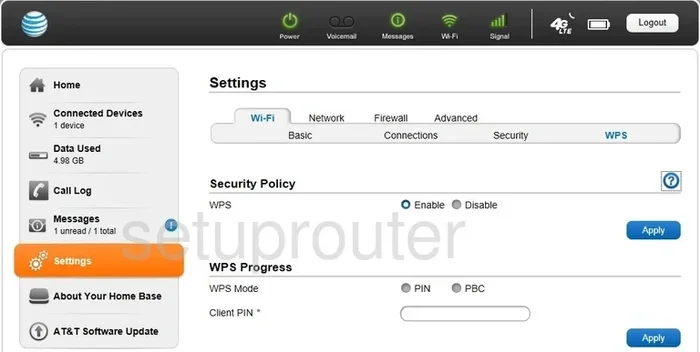
Every device that connects to your Wi-Fi appears in your router’s admin panel. To access this, type your router’s IP address into a web browser. Common addresses are 192.168.1.1 or 192.168.0.1. Log in with your admin credentials. Look for a section called “Connected Devices” or “Device List.” You will see a list of all devices currently using your network. Compare the names and MAC addresses against devices you recognize. An unknown device could be a wireless hidden camera.
Step 2: Use a Network Scanner App
Network scanner apps make detection much easier. Apps like Fing, Advanced IP Scanner, and NetX are free and work on both phones and computers. Simply download one, connect to your Wi-Fi, and run a scan. The app will display every device on your network. Look for devices with generic names like “CAM,” “IP Camera,” or “Unknown Device.” Some hidden cameras use brand names like “WT” or “Y2” which are common Chinese camera brands. If you see a device you do not recognize, investigate further.
Step 3: Monitor Bandwidth Usage
Hidden cameras use bandwidth. Even a small camera streaming video can consume noticeable data. Check your router’s bandwidth usage section. If you see a device using large amounts of data and you do not recognize it, that is a red flag. Some network monitoring tools can alert you when a new device starts using significant bandwidth. This is especially useful for catching cameras that turn on only when motion is detected.
Step 4: Use a Wi-Fi Signal Detector
For a more hands-on approach, you can use a Wi-Fi signal detector or spectrum analyzer. These devices pick up radio signals in your home. Point them around rooms and look for strong signals coming from unusual objects. A hidden camera often transmits on the 2.4 GHz band. A signal detector can help you narrow down the physical location of the device. This method works best when combined with a physical search of your home.
Common Types of Wireless Hidden Cameras
Do Hidden Cameras Show Up On Wi Fi? The answer depends partly on the type of camera. Different hidden cameras have different features and detection challenges. Here are the most common types you might encounter.
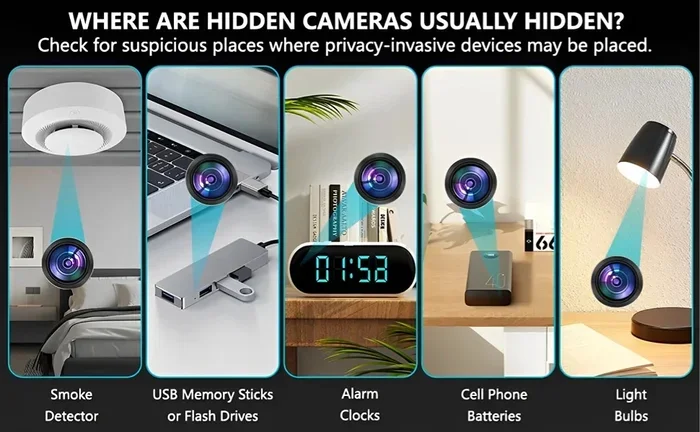
Smoke Detector Cameras
These cameras hide inside fake or modified smoke detectors. They are very popular among spies and stalkers because smoke detectors are common on ceilings. A smoke detector camera often has a tiny lens in the center or near the edge. It connects to Wi-Fi and streams video to a remote server. These cameras are relatively easy to detect on your network because they use standard Wi-Fi protocols.
USB Charger Cameras
A USB charger camera looks like a regular phone charger. It has a tiny lens hidden in the body. Many of these cameras record to an SD card but also connect to Wi-Fi for remote viewing. They are common in offices and hotel rooms. On your Wi-Fi network, they may appear as a generic “IP camera” or with a brand name you do not recognize.
Clock and Alarm Clock Cameras
Clocks are another popular hiding spot. A clock camera can look like any ordinary bedside clock. Some models include night vision and two-way audio. These cameras often connect to 2.4 GHz Wi-Fi and can be found through network scanning tools.
Air Freshener and Plant Cameras
These cameras hide inside decorative items. An air freshener camera might look like a normal home accessory. A plant camera disguises the lens as a leaf or flower. These devices connect to Wi-Fi just like any other smart home gadget. They are harder to spot physically but still leave a digital trace on your network.
Smart Home Device Cameras
Some hidden cameras masquerade as legitimate smart home devices. They may look like a smart plug, a power strip, or even a TV remote. These are the hardest to detect because they blend in with normal household devices. Checking your router’s device list is essential for spotting these imposters.
What to Do If You Find a Hidden Camera
Discovering a hidden camera on your Wi-Fi or in your home can be alarming. Here is what you should do step by step.
- Do not touch or disturb the camera. Evidence is important if you plan to take legal action. Leave the camera where it is.
- Take photos and videos of the device. Document its location, appearance, and any identifying marks or model numbers.
- Disconnect it from power if safe to do so. Unplugging the camera stops it from recording. Do not damage the device.
- Change your Wi-Fi password immediately. This cuts off the camera’s access to your network and prevents remote viewing.
- Contact local law enforcement. Hidden cameras are illegal in most places without consent. File a report and provide your evidence.
- Consider hiring a professional. A licensed private investigator or security expert can conduct a thorough sweep of your property.
Dealing with a hidden camera is stressful, but acting quickly protects your privacy. Most jurisdictions have laws against unauthorized recording. You have legal rights, and law enforcement can help you enforce them.
Preventing Hidden Cameras on Your Network
The best defense is a strong offense. You can take several steps to make your home less vulnerable to hidden cameras.
Secure Your Wi-Fi Network
Start with your router. Use WPA3 encryption if your router supports it. If not, use WPA2 at minimum. Create a strong, unique password that is at least 16 characters long. Change the default admin username and password on your router. Disable WPS (Wi-Fi Protected Setup) because it is a known security weakness. These steps make it much harder for someone to connect a hidden camera to your network without your knowledge.
Regularly Scan Your Network
Make it a habit to check your connected devices every few weeks. Use a network scanner app to review all devices on your Wi-Fi. If you see something unfamiliar, investigate right away. Regular scanning helps you catch unauthorized devices before they can record anything.
Keep Your Router Firmware Updated
Router manufacturers release firmware updates to patch security vulnerabilities. An outdated router is an easy target for someone to exploit. Check your router settings for firmware updates at least once a month. Enabling automatic updates, if available, is the easiest way to stay protected.
Use a Guest Network
Set up a separate guest network for visitors and smart home devices. This isolates your main network from potentially compromised devices. If a guest brings a hidden camera or a smart device with a vulnerability, it stays on the guest network and away from your personal data.
Physical Security Matters Too
Do not rely solely on digital detection. Perform regular physical sweeps of your home. Look for unusual objects, especially in private areas like bedrooms and bathrooms. Use a flashlight to check for tiny lenses that might reflect light. RF signal detectors are affordable and can help you find cameras that transmit wirelessly. Combining digital and physical detection gives you the best coverage.
Do All Hidden Cameras Show Up on Wi-Fi?
Here is an important truth: not all hidden cameras use Wi-Fi. Some cameras use cellular data instead of your home network. Others store footage locally on an SD card and never connect to the internet. These cameras are much harder to detect through network scanning. If you suspect a hidden camera but find nothing on your Wi-Fi, do not assume you are safe. You still need to perform a thorough physical search of your home.
Do Hidden Cameras Show Up On Wi Fi? For most wireless cameras, yes. But the ones that do not use Wi-Fi require a different detection approach. RF detectors, infrared scanners, and physical inspections become essential tools in those cases. A comprehensive home security strategy includes both digital and physical detection methods.
Expert Insights on Hidden Camera Detection
Security professionals recommend a multi-layered approach to finding hidden cameras. No single method catches everything. Here is what experts suggest.
- Combine digital and physical detection. Use network scanning tools alongside physical inspections. One method alone will miss some cameras.
- Check for infrared LEDs. Many hidden cameras have night vision LEDs that are invisible to the naked eye but show up on phone cameras. Open your phone’s camera app and scan your room in the dark. Look for small purple or white lights that do not appear to the naked eye.
- Listen for faint buzzing. Some hidden cameras emit a very soft sound when recording. Turn off all fans and electronics and listen carefully.
- Use a camera lens detector. These devices shine a light that reflects off camera lenses. They are affordable and effective for finding hidden cameras in rooms.
Security expert Mark A. Johnson from SecureHome.org advises, “The most important thing is consistency. Do not scan your network once and assume you are safe forever. Threats evolve, and new hidden camera technologies emerge regularly. Make network monitoring a routine part of your home security practice.”
Key Takeaways
- Hidden cameras often connect to Wi-Fi: Most wireless spy cameras use your home network to transmit video and audio data.
- Network scanning tools are your first line of defense: Apps like Fing and Advanced IP Scanner can identify unknown devices on your Wi-Fi quickly.
- Check your router’s device list regularly: Unknown devices on your network could be hidden cameras or other security threats.
- Not all hidden cameras use Wi-Fi: Some use cellular data or local storage, requiring physical detection methods.
- Securing your network prevents unauthorized access: Strong passwords, updated firmware, and guest networks reduce your vulnerability.
- Physical searches complement digital detection: Use flashlights, RF detectors, and infrared scanners to find cameras that do not appear on your network.
Conclusion
Do Hidden Cameras Show Up On Wi Fi? The answer is a clear yes for most wireless hidden cameras. These devices connect to your home network, and that connection leaves detectable traces. You can find them using network scanner apps, router admin panels, and bandwidth monitoring tools. However, not all hidden cameras rely on Wi-Fi, so a comprehensive approach that includes physical detection is essential. By securing your network, scanning regularly, and staying vigilant, you can protect your privacy and keep your home safe. Knowledge is your greatest weapon against hidden surveillance. Use it wisely and share it with the people you care about.
Take action today. Run a network scan, check your connected devices, and look around your home with fresh eyes. Your privacy is worth protecting, and the tools to do so are more accessible than ever.
Frequently Asked Questions
Can a hidden camera work without Wi-Fi?
Yes, some hidden cameras do not need Wi-Fi at all. These cameras store footage on a local SD card or use cellular data to transmit recordings. They are harder to detect through network scanning but can still be found using physical inspection methods like RF detectors and infrared scanning.
What should I do if I find a hidden camera in my rental home?
First, document the camera with photos and videos without touching it. Then contact your landlord immediately and report the finding to local law enforcement. In most places, installing a hidden camera in a rental property without the tenant’s consent is illegal. You may also want to consult a lawyer about your rights and potential legal action.
Are network scanner apps reliable for finding hidden cameras?
Network scanner apps are reliable for detecting Wi-Fi-connected devices, including hidden cameras. However, they cannot find cameras that use cellular data or local storage only. For the best results, combine network scanning with physical detection tools like RF detectors and infrared cameras.
How can I tell if my Wi-Fi is being monitored by someone?
Signs of unauthorized Wi-Fi monitoring include unknown devices on your network list, unusual bandwidth usage, and slow internet speeds. Regularly checking your router’s connected device list and using a network scanner app can help you catch unauthorized monitoring early.
What frequency do most hidden cameras use to transmit?
Most wireless hidden cameras transmit on the 2.4 GHz frequency band. Some higher-end models use 5 GHz or dual-band connections. A few older or specialized cameras use 900 MHz or 1.2 GHz frequencies. A Wi-Fi signal detector or spectrum analyzer can help you identify which frequencies are active in your home.
Can I legally use a hidden camera detector in my home?
Yes, using a hidden camera detector in your own home is perfectly legal in most countries. These devices help you identify unauthorized surveillance equipment. However, you should never use a hidden camera to spy on someone else without their consent, as this is illegal in most jurisdictions.