Can Usb C Be Converted To Micro Usb Without Any Hassle
Yes, you can convert USB C to Micro USB using a simple adapter or cable. This guide covers everything you need to know about USB-C to Micro USB conversion, including compatibility, adapter types, and step-by-step tips. Whether you have old devices or new ones, making them work together is easier than you think.
Key Takeaways
- USB C to Micro USB conversion is simple: You just need the right adapter or cable to bridge the two connector types.
- Multiple adapter options exist: From simple dongles to full cables, there is a solution for every need and budget.
- Compatibility matters: Not all adapters work equally well. Check your device specs before buying.
- Data transfer and charging both work: A good adapter handles both power delivery and data syncing.
- Common mistakes can cause problems: Using cheap or incompatible adapters leads to slow charging or connection failures.
- USB C is the future: While Micro USB is still common, USB C is becoming the new standard across devices.
📑 Table of Contents
- Can Usb C Be Converted To Micro Usb Without Any Hassle?
- Understanding USB C and Micro USB
- How to Convert USB C to Micro USB
- Compatibility: Will It Work With Your Device?
- Step-by-Step Guide to Converting USB C to Micro USB
- Common Mistakes to Avoid
- USB C vs Micro USB: The Future of Connectivity
- Useful Gadgets for Managing Your USB Connections
- Expert Insights on USB Conversion
- Conclusion
Can Usb C Be Converted To Micro Usb Without Any Hassle?
Let us get straight to the point. Yes, you can convert USB C to Micro USB without any hassle. The process is simple, affordable, and takes just a few minutes. If you have a newer device with a USB Type-C port but need to connect it to an older device that uses a Micro USB connector, an adapter makes it possible.
Many people face this exact problem every day. You buy a new charging cable or gadget, but your old device still uses the older Micro USB standard. Instead of buying all new cables, a simple adapter solves the issue. This guide walks you through every option available.
We will cover adapter types, compatibility checks, step-by-step setup, and common mistakes to avoid. By the end, you will know exactly how to make USB C and Micro USB devices work together seamlessly. Let us dive in.
Understanding USB C and Micro USB
Before we talk about conversion, it helps to understand what each connector type is and why they are different. Both serve the same basic purpose. They transfer power and data. But they look and work quite differently.
What Is USB Type-C?
USB Type-C is a modern connector standard. It is small, reversible, and fast. You can plug it in either direction. No more flipping the cable three times to find the right orientation. USB C supports higher power delivery and faster data transfer speeds compared to older standards.
Most new smartphones, tablets, and laptops use USB-C ports now. The USB power delivery standard allows for faster charging times too. This is why so many people are switching to USB C cables for their everyday devices.
What Is Micro USB?
Micro USB has been around for a long time. It was the go-to connector for many smartphones, fitness trackers, and portable gadgets for over a decade. It is smaller than a standard USB plug but larger than the USB-C connector.
Micro USB has two main versions. The original Micro USB (Micro-A) and the newer Micro USB 3.0 (Micro-B). Both look slightly different but serve the same purpose. Many budget devices and accessories still rely on this older connector type.
Key Differences Between USB C and Micro USB
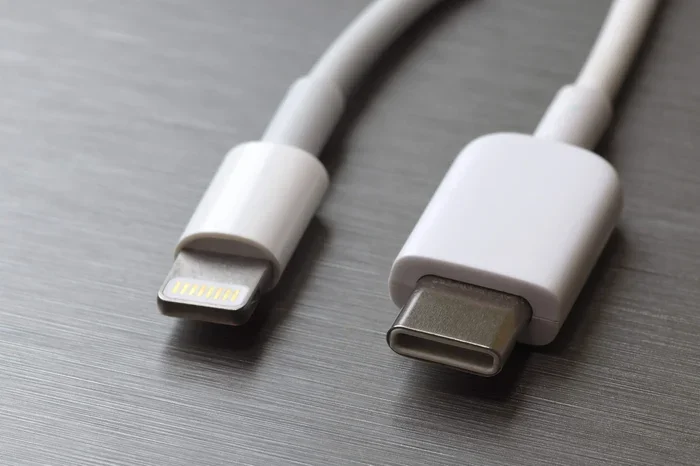
- Shape: USB C is oval-shaped and reversible. Micro USB is trapezoid-shaped and has a specific orientation.
- Speed: USB C supports much faster data transfer rates.
- Power: USB C handles higher wattage for faster charging.
- Durability: USB C connectors tend to last longer.
- Adoption: USB C is the newer standard. Micro USB is becoming legacy.
How to Convert USB C to Micro USB
Now that you understand the basics, let us look at the actual conversion methods. There are a few different ways to make this connection work. Each has its own pros and cons.
Option 1: USB C to Micro USB Adapter
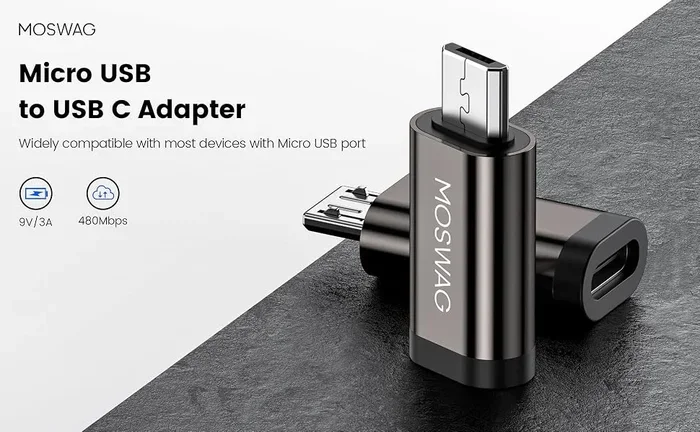
The simplest and most popular method is a USB-C to Micro USB adapter. This small dongle plugs into your USB C port on one side and has a Micro USB female port on the other. You then plug your existing Micro USB cable into the adapter.
These adapters are tiny and portable. You can keep one in your bag or wallet. They work great for charging and basic data transfer. Most adapters cost between five and fifteen dollars, making them a budget-friendly solution.
When shopping for an adapter, look for ones rated for both power and data. Cheap adapters might only handle charging and will fail at data transfer. Check reviews and buy from trusted brands.
Option 2: USB C to Micro USB Cable
Another option is a direct USB-C to Micro USB cable. This is a single cable with a USB C plug on one end and a Micro USB plug on the other. No adapter needed. It is a clean, simple solution.
These cables work well for charging. For data transfer, make sure the cable supports it. Some cables are charging-only and will not sync data. Look for cables labeled as “data and charging” certified.
This option is great if you need a permanent solution. You do not have to carry a separate adapter. Just keep the cable handy and you are good to go.
Option 3: USB OTG Adapter
A USB OTG (On-The-Go) adapter is another option. These adapters let you connect USB devices to your phone or tablet. Some OTG adapters include Micro USB ports alongside USB C ports.
OTG adapters are more versatile. They can connect flash drives, keyboards, and other USB peripherals. If you need a multi-purpose solution, an OTG adapter is worth considering.
Keep in mind that not all phones support USB OTG. Check your device manual or settings to confirm compatibility before buying.
Compatibility: Will It Work With Your Device?
Not every adapter works with every device. Compatibility depends on several factors. Let us break down what to check before you buy.
Check Your Device Ports
First, confirm what ports your devices have. Does your new device have a USB-C port? Does your old device have a Micro USB port? This sounds obvious, but it is the most important step.
Some devices use USB C but have specific power requirements. For example, certain laptops need higher wattage through their USB C port. A basic adapter might not deliver enough power for those devices.
Check Adapter Specifications
Always read the adapter specifications before purchasing. Look for these key details:
- Data transfer speed: Does it support USB 2.0 or USB 3.0 speeds?
- Power delivery rating: What is the maximum wattage it can handle?
- Compatibility: Is it listed as working with your specific device?
- Build quality: Is it made from durable materials?
Using a low-quality adapter can damage your device. Stick with reputable brands and avoid the cheapest options on the market. A few extra dollars spent on quality saves you from potential headaches.
Operating System Considerations
Your device operating system also matters. Android devices with Micro USB ports are common. However, some adapters work better with certain operating systems than others. Windows, macOS, and Android all handle USB connections slightly differently.
For Android users, USB OTG support varies by manufacturer. Samsung, Google Pixel, and OnePlus devices generally have strong OTG support. Budget phones may have limited compatibility. Always check your phone manufacturer’s specifications.
Step-by-Step Guide to Converting USB C to Micro USB
Ready to convert your connection? Follow these simple steps to get everything working.
Step 1: Identify Your Needs
Decide what you need the conversion for. Is it just charging? Do you need data transfer too? This determines which type of adapter or cable you should buy.
Step 2: Choose the Right Adapter or Cable
Based on your needs, pick the right product. For simple charging, any basic adapter works. For data transfer, invest in a higher-quality option that supports full-speed data.
Step 3: Plug In and Test
Connect the USB C end to your device. Plug your Micro USB cable into the adapter or the other end of the cable. Check if the connection works for charging and data.
Step 4: Verify Data Transfer
If you need data transfer, connect the devices and check if files move properly. On Android, you may need to select “File Transfer” mode from the notification panel.
Quick Tips for Best Results
- Always use certified adapters and cables.
- Avoid bending cables at sharp angles.
- Keep your adapter clean and free of dust.
- Store adapters in a small pouch to prevent damage.
- Test the connection before relying on it for important transfers.
Common Mistakes to Avoid
Even though the process is simple, people make mistakes. Here are the most common ones and how to avoid them.
Buying Cheap, Uncertified Adapters
The biggest mistake is buying the cheapest adapter online. These often use poor-quality materials and may not handle power properly. They can overheat, fail quickly, or even damage your device. Always buy from reputable sellers and look for certifications like USB-IF.
Assuming All Adapters Support Data Transfer
Not all adapters handle data. Some are charging-only. If you need to transfer files, make sure the product description explicitly states it supports data transfer. Check reviews and product specs carefully.
Ignoring Power Requirements
Some devices need more power than others. A basic adapter might work fine for a phone but fail for a tablet or laptop. Always check the power requirements of your device and match them with the adapter’s capabilities.
Forcing the Connector
Never force a connector into a port. If it does not fit, something is wrong. Check the orientation and try again gently. Forcing connections can damage both the port and the adapter.
USB C vs Micro USB: The Future of Connectivity
The tech world is moving toward USB C as the universal standard. Most new devices now come with USB C ports. This shift means Micro USB is becoming less common in newer products.
However, many existing devices still use Micro USB. Fitness trackers, Bluetooth speakers, smartwatches, and older phones all rely on it. This is exactly why USB C to Micro USB adapters remain so useful.
Governments in several countries are pushing for USB C standardization. The European Union, for example, has mandated USB C for most electronic devices. This trend will likely continue worldwide. Investing in USB C accessories now future-proofs your setup.
Even as Micro USB fades out, adapters ensure your older devices keep working. You do not need to replace every gadget just because the connector standard changed. A simple adapter bridges the gap between old and new technology.
Useful Gadgets for Managing Your USB Connections
Managing multiple cables and adapters can get messy. There are helpful tools and gadgets that make cable management easier. If you want to simplify your setup, consider exploring 10 gadgets that make life easier. Many of these are perfect for organizing charging cables, adapters, and other tech accessories. A good cable organizer saves time and reduces clutter around your workspace.
Another helpful tool is a multi-port charging station. These hubs let you charge multiple devices at once. Some even include USB C and Micro USB ports built in. This eliminates the need for separate adapters entirely.
For those dealing with phone number management on the go, learning how to add prefixes to numbers on iPhone can be a handy skill. While not directly related to USB connections, managing contact details efficiently complements your overall tech organization. When you are juggling multiple devices and cables, every bit of organization helps.
Expert Insights on USB Conversion
We asked tech experts about the best practices for USB C to Micro USB conversion. Here is what they recommend.
Quality over price: Always invest in a well-reviewed adapter. The small savings from a cheap adapter are not worth the risk of damaging your devices.
Check for certification: Look for USB-IF certification on adapters and cables. This ensures the product meets industry standards for safety and performance.
Keep spares: Buy two or three adapters. Keep one at home, one in your bag, and one at the office. You never know when you will need a quick connection.
Update firmware: Some devices need firmware updates to work properly with adapters. Check your manufacturer’s website for the latest updates before troubleshooting connection issues.
Test regularly: Periodically test your adapters and cables. Worn-out adapters can cause intermittent charging issues or slow data transfer. Replace them when you notice problems.
Conclusion
Converting USB C to Micro USB is straightforward and hassle-free when you have the right tools. Whether you choose a simple adapter, a direct cable, or a versatile OTG hub, the solution exists for every need and budget. The key is to buy quality products, check compatibility, and follow best practices.
USB C is the future, but Micro USB is still very much present in our daily lives. Adapters and converters bridge the gap between old and new technology beautifully. With the right approach, you can keep all your devices connected and working together.
Remember these key points. Use certified adapters, match power requirements, and never force connections. Follow these tips and your USB C to Micro USB conversion will work flawlessly every time. Happy connecting!
Frequently Asked Questions
Can I Use a USB C to Micro USB Adapter for Fast Charging?
Yes, but only if the adapter supports fast charging. Check the adapter’s power delivery rating and make sure it matches your device’s charging requirements. Cheap adapters often cannot handle fast charging speeds.
Will a USB C to Micro USB Adapter Work for Data Transfer?
It depends on the adapter. Some adapters are charging-only and do not support data transfer. Always check the product description to confirm that the adapter handles both power and data.
Is USB C to Micro USB Conversion Permanent?
No, it is not permanent. You can use an adapter or cable temporarily whenever needed. Simply plug it in when you want to connect your devices and remove it when you are done.
Can I Charge a Micro USB Device Using a USB C Charger?
Yes, with the right adapter. A USB C charger paired with a USB C to Micro USB adapter or cable will charge most Micro USB devices. Just make sure the adapter supports the correct power output.
Are All USB C to Micro USB Adapters the Same?
No, they are not all the same. Adapters vary in quality, data transfer speed, power delivery, and build quality. Always compare specifications and read reviews before purchasing.
How Long Does a USB C to Micro USB Adapter Last?
A good quality adapter can last several years with regular use. However, cheap adapters may fail within months. Investing in a certified, well-built adapter extends its lifespan significantly.