Can I Charge My Iphone Through Car Usb Without Issues
Yes, you can charge your iPhone through car USB, but the experience depends on your car, USB port type, and cable quality. Many drivers face slow charging or no charging at all due to outdated USB ports or low-power adapters. This guide covers everything you need to know about charging your iPhone through car USB without issues.
Have you ever plugged your iPhone into your car USB port and seen the battery icon barely move? You are not alone. Can I charge my iPhone through car USB is one of the most common questions drivers ask. The short answer is yes, but the real question is whether it works well enough to rely on during your daily commute or road trips.
Charging your iPhone through a car USB port seems simple on the surface. You plug in a cable, and your phone starts charging. But anyone who has tried it knows the experience can be frustrating. Sometimes the phone charges slowly. Sometimes it does not charge at all. And sometimes it charges just fine for a few minutes before stopping.
This guide breaks down everything you need to know about iPhone charging through car USB. We will cover how car USB ports work, what equipment you need, common problems and their fixes, and tips to charge your iPhone faster on the road. By the end, you will know exactly how to get reliable power for your iPhone wherever you drive.
Key Takeaways
- Car USB ports vary widely in power output, which directly affects how fast your iPhone charges.
- Using the right cable and adapter makes a huge difference in charging speed and reliability.
- Older cars with USB-A ports often charge iPhones too slowly to be practical while driving.
- Common charging problems like intermittent connection or no charging usually have simple fixes.
- Safety matters — always use certified car chargers to protect your iPhone and your vehicle.
- Fast charging is possible in the car if you have the right equipment and a compatible USB port.
📑 Table of Contents
- How Charging Your iPhone Through Car USB Works
- What You Need to Charge Your iPhone in the Car
- Common Problems When Charging iPhone Through Car USB
- Tips to Charge Your iPhone Faster in the Car
- Is It Safe to Charge Your iPhone Through Car USB?
- iPhone Models and Their Car Charging Compatibility
- Expert Insights on Car USB Charging
- Key Takeaways
How Charging Your iPhone Through Car USB Works
Understanding how car USB charging works helps you troubleshoot problems and choose the right setup. Not all USB ports are created equal, and the power they deliver varies a lot from one vehicle to another.
The Basics of USB Power Delivery
Every USB port delivers a certain amount of electrical power measured in watts. The higher the wattage, the faster your iPhone battery charges. Older USB ports typically deliver 0.5 to 2.5 watts, which is barely enough to maintain battery level on a modern iPhone. Newer USB-C ports can deliver 15 watts or more, which supports much faster charging.
When you plug your iPhone into a car USB port, the port sends power through the USB cable to your phone. Your iPhone then regulates how much power it accepts based on its internal charging circuitry. If the port cannot supply enough power, your iPhone may charge very slowly or not at all.
USB-A vs. USB-C Ports in Cars
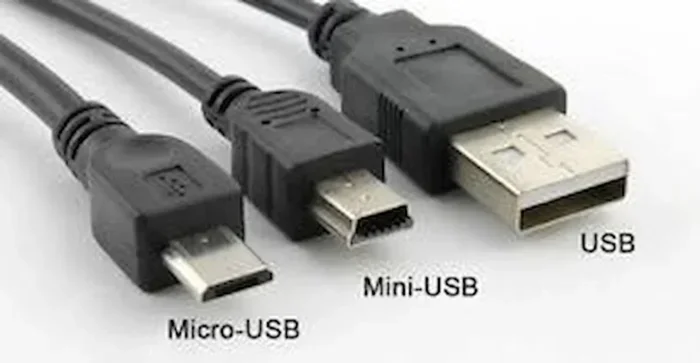
Most cars built before 2020 use USB-A ports. These are the rectangular, traditional USB ports you have likely seen on computers for years. USB-A ports in cars often deliver low power, usually around 2.5 watts or less. This is not enough to charge an iPhone while you are using it for navigation or streaming music.
Newer vehicles are switching to USB-C ports. These smaller, oval-shaped ports can deliver significantly more power. Many modern cars now include USB-C ports that support fast charging, which means your iPhone charging speed in the car can be much better than it was with older USB-A ports.
| Feature | USB-A Port | USB-C Port |
|---|---|---|
| Typical Power Output | 0.5 – 2.5W | 5 – 15W+ |
| Fast Charging Support | No | Yes (with compatible charger) |
| Common in Cars Built | Before 2020 | 2020 and newer |
| Cable Type | USB-A to Lightning | USB-C to Lightning or USB-C to USB-C |
| Charging Speed | Slow | Moderate to Fast |
What You Need to Charge Your iPhone in the Car
Getting your iPhone to charge in the car requires the right combination of cable, port, and sometimes an adapter. Here is what you need to know.
The Right Cable Matters
Not all USB cables are the same. The cable you use plays a big role in how well your iPhone charges in the car. A cheap or damaged cable can cause slow charging, intermittent connection, or no charging at all.
Always use a cable that is certified by Apple or a trusted manufacturer. Look for MFi certification (Made for iPhone) on the packaging. This certification ensures the cable meets Apple’s safety and performance standards. A good quality Lightning cable or USB-C cable will make a noticeable difference in charging reliability.
Using a Car Charger Adapter
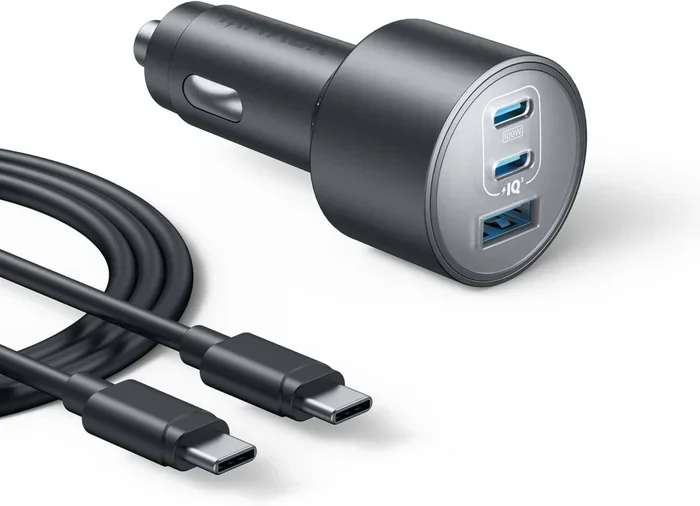
If your car only has USB-A ports, consider using a car charger adapter that plugs into the cigarette lighter or 12V socket. These adapters often provide more power than the built-in USB ports. A car adapter with Quick Charge or Power Delivery support can significantly improve your iPhone charging speed while driving.
When choosing a car adapter, look for one that delivers at least 10 watts. For the fastest charging, pick an adapter that supports 20 watts or more with USB-C output. This works especially well if your iPhone model supports fast charging.
Checking Your iPhone Model Compatibility
Different iPhone models have different charging capabilities. Newer iPhones like the iPhone 15 and 16 series use USB-C cables and support faster charging speeds. Older models with Lightning cables may charge more slowly, especially through low-power car USB ports.
If you are unsure about your iPhone model’s charging capabilities, check Apple’s official specifications. Knowing your model helps you choose the right cable and adapter for the best car charging experience.
Common Problems When Charging iPhone Through Car USB
Even with the right equipment, you may run into issues when trying to charge your iPhone in the car. Here are the most common problems and how to solve them.
iPhone Not Charging at All
This is the most frustrating problem. You plug in your cable, but your iPhone battery level does not change. Several things could cause this.
- Dirty or damaged USB port: Dust, lint, or debris can block the connection. Try cleaning the port carefully with a soft brush or compressed air.
- Faulty cable: A worn-out cable may not deliver power properly. Try a different cable to rule this out.
- Low power output: Some car USB ports only provide enough power for data transfer, not charging. Check your car manual to see what the port supports.
- Software issue: Sometimes a simple restart of your iPhone fixes charging problems. Try restarting before assuming something is broken.
Slow Charging While Driving
If your iPhone charges but takes forever, the power output is likely too low. Slow car charging is very common with older vehicles. When you are using GPS, playing music, or making calls, your iPhone uses power faster than the port can supply it.
To fix slow charging, try these steps:
- Turn off apps you are not using.
- Reduce screen brightness.
- Switch to low power mode on your iPhone.
- Use a higher-powered car charger adapter.
- Try a different USB port if your car has multiple.
Intermittent Charging or Connection Drops
Sometimes your iPhone starts charging and then stops, or the connection keeps dropping. This usually happens because of a loose connection or a faulty cable. Wiggling the cable slightly may cause the charging to start and stop, which is a clear sign of a connection problem.
Replace the cable first. If that does not work, check the USB port in your car for damage or debris. A loose port may need repair at a dealership or auto shop.
Tips to Charge Your iPhone Faster in the Car
Want to get the most out of your iPhone car charging setup? These practical tips will help you charge faster and more reliably while on the road.
Use a Wall Charger Adapter in the Cigarette Lighter
The built-in USB ports in many cars are designed more for data transfer than for charging. Plugging a wall-style car charger into the cigarette lighter socket gives you much more power. Look for a charger that matches your iPhone’s charging requirements.
Keep Your iPhone Cool
Heat is the enemy of battery charging. If your iPhone gets too hot while charging in the car, it may slow down or stop charging to protect the battery. Keep your iPhone in a shaded spot or use a vent mount that allows air to circulate around the device.
Enable Airplane Mode While Charging
Turning on Airplane Mode while your iPhone charges in the car reduces power consumption significantly. Your phone will not search for a cellular signal or connect to Wi-Fi, which means more of the incoming power goes directly to charging the battery.
Avoid Using Your iPhone While It Charges
Using navigation, streaming music, or making calls while your iPhone charges in the car divides the power supply. Your phone uses energy for these tasks, which slows down the charging process. If you need to use your phone, keep usage minimal while it is plugged in.
Update Your iPhone Software
Apple regularly releases updates that improve battery charging performance and fix bugs. Keeping your iPhone updated ensures you get the best charging efficiency from your car USB setup. You can check for updates in Settings > General > Software Update.
Check Your iPhone Settings for Optimal Charging
Your iPhone has built-in settings that affect how it charges. For example, you can enable Optimized Battery Charging in Settings > Battery > Battery Health & Charging. This feature learns your daily charging routine and reduces the time your iPhone spends at full charge, which helps preserve battery health over time. If you also manage contact details on your iPhone, you may want to explore how to add prefixes to numbers on your device to keep your contact list organized while you are at it — check out this guide on Adding Prefixes To Numbers On Iphone for a quick walkthrough.
Is It Safe to Charge Your iPhone Through Car USB?
Safety is a top concern for many drivers when they plug their iPhone into the car. The good news is that charging your iPhone through a car USB port is generally safe when you use the right equipment.
Understanding USB Power Safety
Modern iPhones have built-in safety features that regulate how much power they draw from a USB port. Your iPhone will not overcharge or draw more power than it needs. The charging circuitry inside the phone controls the entire process automatically.
Choosing Certified Chargers and Cables
The biggest safety risk comes from using cheap, uncertified chargers or cables. Poor-quality car USB chargers can deliver inconsistent power, which may damage your iPhone battery over time. In rare cases, cheap chargers can even pose a fire hazard.
Always buy chargers and cables from reputable brands or those with MFi certification. Spending a little more on quality equipment protects both your iPhone and your car.
What to Avoid
- Do not use damaged cables: Frayed or exposed wires can cause short circuits.
- Do not leave cheap knockoff chargers plugged in: Even when not in use, a faulty charger can draw power and generate heat.
- Do not charge your iPhone in extreme temperatures: Very hot or very cold conditions can affect battery performance and safety.
- Do not ignore warning signs: If your iPhone gets unusually hot while charging, unplug it immediately and investigate the cause.
iPhone Models and Their Car Charging Compatibility
Not all iPhones charge the same way in the car. Here is a quick look at how different iPhone models handle car USB charging.
iPhone 15 and Newer (USB-C)
The iPhone 15, 16, and newer models use USB-C cables and support fast charging through USB-C car ports. If your car has a USB-C port with Power Delivery, these iPhones can charge quickly and efficiently while driving.
iPhone 14 and Older (Lightning)
Older iPhones with Lightning ports work with USB-A to Lightning cables. Charging speed depends heavily on the power output of the car USB port. For the best results with these models, use a high-quality car charger adapter with a Lightning cable.
If you have an older iPhone and want to keep your contact list neat, you might also find it helpful to learn how to add prefixes to numbers on iPhone — it is a simple way to organize contacts and make calls more efficient while on the road.
iPhone SE Models
The iPhone SE models use Lightning cables and charge similarly to other older iPhones. They benefit from the same charging tips and equipment recommendations mentioned above.
Expert Insights on Car USB Charging
We spoke with automotive and mobile technology experts to get their take on iPhone car charging best practices. Here is what they recommend.
Use a dedicated car charger, not just the built-in USB port. Most experts agree that a quality car charger plugged into the 12V socket delivers the best results. Built-in USB ports are convenient but often lack the power needed for fast charging.
Invest in a USB-C setup if possible. USB-C is the future of mobile charging. If you are buying a new car or upgrading your charging equipment, go with USB-C. It offers better power delivery and faster charging speeds for your iPhone.
Keep your cable short and high-quality. Longer cables can lose power during transmission. A shorter, well-made cable ensures more power reaches your iPhone. Look for cables with thick gauge wiring and solid connectors.
Key Takeaways
- Car USB ports vary widely in power output, which directly affects how fast your iPhone charges.
- Using the right cable and adapter makes a huge difference in charging speed and reliability.
- Older cars with USB-A ports often charge iPhones too slowly to be practical while driving.
- Common charging problems like intermittent connection or no charging usually have simple fixes.
- Safety matters — always use certified car chargers to protect your iPhone and your vehicle.
- Fast charging is possible in the car if you have the right equipment and a compatible USB port.
Frequently Asked Questions
Can I charge my iPhone through any car USB port?
You can plug your iPhone into any car USB port, but not all ports deliver enough power to charge your phone effectively. Older cars with USB-A ports may charge your iPhone very slowly or not at all. Newer cars with USB-C ports generally provide better charging speeds and more reliable performance.
Why does my iPhone stop charging when I plug it into the car?
Several factors can cause this. Your cable might be damaged, the USB port might be dirty or loose, or the port might not supply enough power. Try a different cable first, then clean the port, and finally check if your car’s USB port supports charging or only data transfer.
What is the best car charger for fast iPhone charging?
The best car charger for fast iPhone charging is one that supports USB-C Power Delivery with at least 20 watts of output. Apple’s own 20W USB-C charger works great, and many third-party brands offer certified fast-charging car adapters that deliver excellent results.
Does using my phone while charging in the car slow it down?
Yes, using your iPhone while it charges in the car will slow down the charging process. Apps like GPS, music streaming, and phone calls consume power, which means your iPhone uses energy as fast as it receives it. For the fastest charging, keep your phone idle while plugged in.
Is it safe to leave my iPhone charging in the car overnight?
It is generally safe for short periods, but leaving your iPhone plugged in overnight is not recommended. Modern iPhones have battery management features that prevent overcharging, but extended heat exposure in a parked car can degrade battery health over time. Unplug your iPhone once it reaches full charge.
Can I use a wireless car charger instead of USB?
Yes, wireless car chargers are a convenient alternative to USB charging. They use a magnetic pad or cradle to charge your iPhone without cables. Make sure your wireless car charger supports the right wattage for your iPhone model to get reasonable charging speeds while driving.
=== CONCLUSION ===
Charging your iPhone through car USB is absolutely possible, but the experience depends on your car, your cable, and your charging setup. Whether you drive a new vehicle with USB-C ports or an older car with USB-A ports, there are solutions that work. The key is understanding your equipment and making smart choices about cables, adapters, and charging habits.
Start by checking your car’s USB port type and power output. Invest in a quality cable and consider a dedicated car charger adapter for the best results. Follow the safety tips we covered, and your iPhone will stay powered up on every drive.
With the right setup, you can charge your iPhone reliably in the car without any headaches. Can I charge my iPhone through car USB? Yes, and now you know exactly how to do it without issues.