Do Beats Work Well With Iphone Here Is What You Need To Know
Yes, Beats headphones work well with iPhone. They pair easily through Bluetooth, support Apple features like Siri and spatial audio, and deliver solid sound quality. Whether you own Beats Solo, Studio, or Fit Pro, your iPhone delivers a smooth and reliable connection. This guide covers everything you need to know about using Beats with your iPhone.
Do Beats work well with iPhone? The short answer is yes. Beats headphones and earbuds connect smoothly to iPhones and offer a solid listening experience. Apple owns Beats, so the two brands were practically made for each other. If you own an iPhone and are thinking about buying Beats, you are making a good choice.
In this guide, we will walk through everything you need to know. We will cover pairing, sound quality, features, and common issues. By the end, you will know exactly how Beats and iPhone work together.
Key Takeaways
- Seamless Pairing: Beats connect to iPhone quickly and easily using Bluetooth.
- Apple Features Supported: You get Siri access, spatial audio, and automatic device switching.
- Multiple Models Work Great: Beats Solo, Studio, Fit Pro, and Powerbeats all pair well with iPhone.
- Firmware Updates Matter: Keeping your Beats updated ensures the best performance.
- Minor Issues Exist: Some models may face interference from iPhone cases or older iOS versions.
- Beats App Helps: The Beats app for iPhone lets you customize settings and update firmware.
- Battery Life Is Strong: Most Beats models offer long listening hours on a single charge.
📑 Table of Contents
- Do Beats Work Well With iPhone?
- How to Pair Beats with iPhone
- Sound Quality: How Do Beats Sound on iPhone
- Features That Make Beats Work Great with iPhone
- Common Issues When Using Beats with iPhone
- Beats Models That Work Best with iPhone
- Tips to Get the Best Experience with Beats and iPhone
- Beats vs. AirPods on iPhone
- Expert Insights: What People Say About Beats and iPhone
- Final Thoughts: Do Beats Work Well With iPhone
Do Beats Work Well With iPhone?
The simple answer is yes. Beats headphones and earbuds work very well with iPhone. Apple bought Beats back in 2014, and since then the two have worked closely together. This means Beats products are built with iPhone users in mind.
When you pair Beats with iPhone, the connection is fast and stable. Most models use Bluetooth, which is built right into every iPhone. You do not need any extra accessories or apps to get started. Just open the case, hold it near your iPhone, and tap connect.
Beats also take advantage of Apple features. You can use Siri with a simple voice command. Spatial audio works on supported models. And automatic switching between your iPhone, iPad, and Mac is seamless. These features make Beats a great choice for iPhone users.
Now, not every Beats model is exactly the same. Some work better than others. But overall, the Beats and iPhone combination is one of the best in the market today.
Why the iPhone and Beats Combo Is Popular
The iPhone and Beats pairing is popular for a few reasons. First, Apple designed both products. This means they share the same ecosystem. Second, Beats are known for their bass-heavy sound, which many iPhone users love. Third, the build quality of Beats headphones is top-notch.
Many people also love the style of Beats. They look sleek and modern. They come in many colors and designs. So you get great sound and great looks when you pair Beats with your iPhone.
How to Pair Beats with iPhone
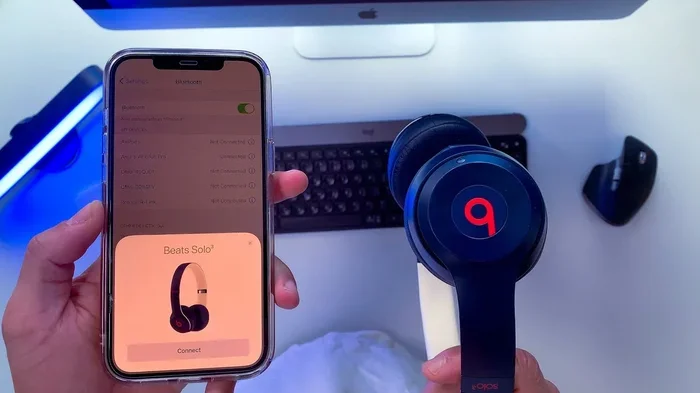
Pairing Beats with iPhone is very easy. The process takes less than a minute. Here is how you do it step by step.
First, make sure your Beats are charged. You cannot pair them if the battery is dead. Most Beats models flash a light when they are ready to pair.
Second, go to your iPhone settings. Tap on Bluetooth and make sure it is turned on. Third, hold your Beats close to your iPhone. The Beats should appear on your screen under Other Devices.
Tap on the Beats name to connect. That is it. Your Beats are now paired with your iPhone.
Quick Pairing Tips for Beats and iPhone
- Reset your Beats first if they do not show up. Hold the power button for 10 seconds.
- Turn off other Bluetooth devices nearby to avoid connection issues.
- Update your iPhone to the latest iOS version before pairing.
- Remove your iPhone case if the Beats are not connecting. Some cases block Bluetooth signals.
- Check the battery level on both devices before trying to pair.
Pairing Beats Fit Pro and Solo with iPhone
The Beats Fit Pro and Beats Solo connect to iPhone the same way. Open the case, press the button on the back, and hold it near your iPhone. The setup animation appears on your screen. Tap Connect, and you are done.
These models also support Apple H1 or W1 chips. These chips make the connection even faster. You get less lag and a more stable signal. This is one of the reasons Beats work so well with iPhone.
Sound Quality: How Do Beats Sound on iPhone
One of the biggest questions people ask is about sound quality. Do Beats sound good on iPhone? The answer is yes. Beats headphones are known for their strong bass and clear mids. When you pair them with an iPhone, the sound stays rich and full.
iPhone has a powerful audio processor. It works well with Beats drivers to deliver clean sound. Whether you are listening to music, podcasts, or calls, the quality is impressive.
Beats Sound Profile on iPhone
Beats have a signature sound profile. The bass is deep and punchy. The mids are clear, which is great for vocals. The highs are bright but not harsh. This profile works really well on iPhone.
Apple Music supports spatial audio, and Beats models with this feature shine on iPhone. You get a surround-sound feel when listening to compatible tracks. It makes music feel more alive and immersive.
If you use Apple Music, Spotify, or YouTube, Beats with iPhone will sound great. The audio quality is consistent across all apps. You do not need to change any settings to get good sound.
Beats Studio vs. Beats Solo on iPhone
The Beats Studio and Beats Solo both sound excellent on iPhone. The Studio has stronger noise cancellation. The Solo is lighter and more portable. Both deliver rich, bass-heavy sound that iPhone users love.
If you want the best sound, the Studio is the top pick. If you want something for daily commuting, the Solo is a great choice. Either way, you get solid performance when paired with iPhone.
Features That Make Beats Work Great with iPhone
Beats come with features that are designed for iPhone users. These features make the experience even better. Let us look at the most important ones.
Siri Integration
You can use Siri with Beats on iPhone. Just say Hey Siri and ask for what you need. You can play music, make calls, or check the weather. This works hands-free, which is very convenient.
Siri integration is one of the biggest advantages of Beats with iPhone. Android users do not get this experience. So if you are in the Apple ecosystem, you get a lot of value here.
Spatial Audio Support
Spatial audio is a feature that makes sound feel 3D. It is available on supported Beats models and iPhone. When you watch movies or listen to music, the audio moves around you.
This feature works best with Apple Music and Disney Plus. Not all Beats models support it, but the ones that do offer a premium experience on iPhone. It is one of the reasons Beats and iPhone are a great match.
Automatic Device Switching
If you use multiple Apple devices, you will love this feature. Beats can switch automatically between your iPhone and iPad. You start watching a video on your iPhone, then pick up your iPad. The audio moves to the iPad without you doing anything.
This feature requires iCloud and Bluetooth to be on. It works on Beats models with H1 or W1 chips. It is one of the smoothest features in the Apple ecosystem.
Find My Integration
Lost your Beats? Use the Find My app on iPhone to locate them. This feature works with Beats Fit Pro, Solo, and Studio. You can see their last known location on a map.
This is a huge plus for iPhone users. It adds a layer of security and peace of mind. You do not need a separate app to track your Beats.
Battery Life and Charging
Beats are known for long battery life. Most models last between 5 and 40 hours depending on the model. The Beats Fit Pro lasts about 6 hours per charge. The Beats Studio lasts up to 40 hours with noise cancellation off.
Charging is fast too. A quick 5-minute charge gives you 3 hours of playback. This is very useful when you are in a hurry. And since Beats use the same charging cable as iPhone in some models, it is very convenient.
Common Issues When Using Beats with iPhone
Beats work well with iPhone, but there are a few common issues. Knowing about them helps you fix problems quickly.
Bluetooth Interference
Sometimes Beats disconnect from iPhone. This usually happens because of Bluetooth interference. Other wireless devices, Wi-Fi routers, or even USB 3.0 ports can cause this.
To fix this, move away from other wireless devices. Turn off Bluetooth on devices you are not using. And keep your iPhone away from USB 3.0 hubs or cables.
iPhone Case Interference
Some iPhone cases block Bluetooth signals. This can cause Beats to disconnect or not pair properly. MagSafe cases are usually fine, but thick or metal cases can cause issues.
If your Beats are not connecting, try removing your iPhone case. This simple fix works more often than you think.
Outdated Firmware
Beats need firmware updates to work their best. Old firmware can cause connection problems or missing features. The Beats app for iPhone handles these updates.
Open the Beats app and check for updates. Keep your iPhone and Beats on the latest versions. This ensures the best performance and compatibility.
Low Volume or Distorted Sound
Sometimes the volume is low or sounds distorted on iPhone. This can happen if the volume limit is turned on. Go to Settings, then Music, then Volume Limit. Make sure it is turned off or set to maximum.
Also, check if the Equalizer is set correctly. Go to Settings, then Music, then EQ. Setting it to Off or Bass Booster can improve the sound.
Beats Models That Work Best with iPhone
Not all Beats models are the same when it comes to iPhone compatibility. Some models offer more features than others. Here is a look at the best Beats models for iPhone users.
| Beats Model | Bluetooth | Siri | Spatial Audio | Battery Life |
|---|---|---|---|---|
| Beats Fit Pro | Yes | Yes | Yes | 6 hours |
| Beats Solo 4 | Yes | Yes | No | 50 hours |
| Beats Studio Pro | Yes | Yes | Yes | 40 hours |
| Beats Powerbeats Pro | Yes | Yes | No | 9 hours |
| Beats Pill+ | Yes | No | No | 12 hours |
The table above shows how different Beats models compare. All of them work with iPhone, but the features vary. The Fit Pro and Studio Pro are the top picks for iPhone users.
Best Beats for iPhone in 2024
If you are shopping for Beats in 2024, the Beats Fit Pro and Beats Solo 4 are the best choices. The Fit Pro offers spatial audio and a secure fit. The Solo 4 has incredible battery life and a lightweight design. Both pair perfectly with iPhone.
The Beats Studio Pro is great if you want the best noise cancellation. The Powerbeats Pro is ideal for workouts. Each model has its strengths, but all of them work well with iPhone.
Tips to Get the Best Experience with Beats and iPhone
Want to get the most out of your Beats and iPhone? Here are some practical tips to follow.
- Keep both devices updated. Software updates fix bugs and add new features. Always install the latest iOS and Beats firmware.
- Use the Beats app. It lets you customize controls, update firmware, and check battery levels.
- Store Beats in the case. This protects them and keeps the battery healthy.
- Clean the speakers regularly. Earwax and dust can reduce sound quality. Use a soft cloth to wipe them down.
- Turn off Bluetooth when not in use. This saves battery on both devices and reduces interference.
- Use Apple Music for spatial audio. It is the best platform to experience spatial audio on Beats with iPhone.
- Reset Beats if problems persist. A simple reset often fixes connection and sound issues.
Quick Tips for Daily Use
- Put Beats in the case when you are not using them.
- Charge Beats before the battery hits zero.
- Use the same Apple ID on all devices for automatic switching.
- Turn on Find My so you can locate lost Beats.
- Adjust EQ settings in iPhone Music for a personalized sound.
Beats vs. AirPods on iPhone
Many people wonder how Beats compare to AirPods on iPhone. Both work great with iPhone, but they are different in important ways.
Beats have stronger bass and a more sporty design. AirPods are lighter and more compact. Beats usually cost less than AirPods Pro. Both support Siri, spatial audio, and automatic switching.
If you prefer a bass-heavy sound and over-ear design, Beats are the better choice. If you want something small and lightweight, AirPods might be the way to go. But when it comes to iPhone compatibility, both are excellent.
Expert Insights: What People Say About Beats and iPhone
Audio experts and reviewers agree that Beats work very well with iPhone. The seamless pairing, Apple feature support, and sound quality make them a top pick. Many tech reviewers give Beats high marks for iPhone users.
One common feedback is that the Beats app is easy to use. It makes firmware updates and settings simple. Another highlight is the battery life. Most users say Beats last longer than expected on a single charge.
Some users mention that the bass can be too strong for certain music styles. But this is a matter of personal preference. You can always adjust the EQ in iPhone settings to suit your taste.
Final Thoughts: Do Beats Work Well With iPhone
So, do Beats work well with iPhone? Absolutely. Beats headphones and earbuds connect easily, sound great, and support many Apple features. Whether you choose the Beats Fit Pro, Solo, Studio, or Powerbeats, you will get a reliable and enjoyable experience with your iPhone.
The Beats and iPhone combo is one of the best in the market. Apple designed both to work together, and it shows. From pairing to sound quality to features, everything feels smooth and natural.
If you own an iPhone and want great headphones, Beats are a fantastic choice. They offer value, quality, and a seamless experience. You really cannot go wrong with this pairing.
Now that you know how well Beats work with iPhone, it is time to make the most of it. Keep your devices updated, explore the settings, and enjoy your music the way it was meant to be heard.
Frequently Asked Questions
Can I connect Beats to iPhone without Bluetooth?
No, Beats connect to iPhone using Bluetooth. There is no wired option for most Beats models. However, some Beats Studio models include a 3.5mm audio cable that you can plug into your iPhone if you prefer a wired connection.
Why are my Beats not showing up on my iPhone?
This usually happens when Beats are not in pairing mode or the battery is low. Try resetting your Beats and putting them back in pairing mode. Also make sure your iPhone Bluetooth is turned on and your Beats are charged.
Do Beats work with iPhone 15?
Yes, Beats work perfectly with iPhone 15. All modern Beats models connect via Bluetooth and are fully compatible with iPhone 15. The experience is the same as with older iPhone models.
Can I use Siri with Beats on iPhone?
Yes, you can use Siri with Beats on iPhone. Just say Hey Siri and give your command. This works on Beats models that support it, including Fit Pro, Solo, and Studio.
Is the Beats app necessary for iPhone?
The Beats app is not required for basic use. But it is very helpful. It lets you update firmware, customize controls, check battery levels, and reset your Beats. It makes managing your Beats on iPhone much easier.
Do Beats work with iPhone case on?
Most Beats work fine with an iPhone case on. However, thick or metal cases can sometimes interfere with Bluetooth. If you have connection issues, try removing the case and pairing again.
=== CONCLUSION ===
Do Beats work well with iPhone? Yes, they do. Beats and iPhone are a perfect match. The pairing is easy, the sound is great, and the Apple features add real value. Whether you listen to music, take calls, or watch videos, Beats deliver a fantastic experience on iPhone.
Keep your devices updated, use the Beats app, and explore all the features. You will get the most out of your Beats and iPhone combination. Enjoy your music and make the most of every listen.