Can You Use A Qr Code Without A Website And Still Succeed
Yes, you can absolutely use a QR code without a website and still succeed. QR codes can link directly to digital files, contact information, social media profiles, or plain text — no web hosting needed. This simple approach saves time and money while giving businesses a fast, effective way to share information with their audience.
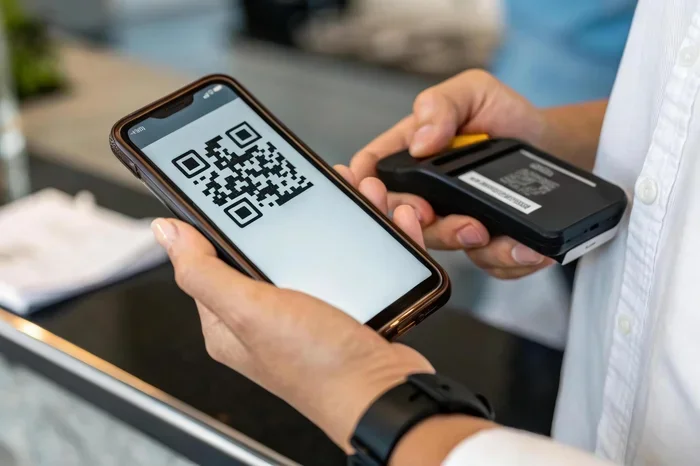
Walk down any busy street, and you will see them. Square, black-and-white patterns staring back at you from shop windows, restaurant tables, and bus stops. These are QR codes. For years, people have assumed that scanning one always takes them to a website. But what if you do not have a site? What if you just want to share a quick piece of information? This is where the magic of a QR code without a website comes in. Many people ask, Can You Use A Qr Code Without A Website, and the answer is a simple yes. You can use these codes to share data directly, bypassing the need for a full website entirely. It is a clever trick that saves time, money, and effort.
When you use a QR code without a website, you are using the code as a direct bridge. Instead of sending someone to a URL, you send them straight to the information they need. This method is perfect for quick interactions. It works beautifully for sharing Wi-Fi passwords, contact details, or simple text messages. Understanding how this works can change the way you think about print media and digital sharing. You do not need a web developer or a hosting plan to make it work. You just need the right tool and a clear idea of what you want to share.
If you have ever wondered about the scan rate of these offline codes, you are not alone. People love the convenience of a quick scan. They do not want to type out long strings of text or wait for a webpage to load. A QR code without a website delivers instant gratification. It puts the information right in front of the smartphone user in seconds. In this guide, we will walk you through exactly how this works and why it might be the perfect solution for your next project.
Key Takeaways
- QR codes work without a website: link them directly to files, profiles, or digital content.
- Free generators make setup easy: create functional codes in minutes at no cost.
- Printed QR codes still drive traffic: business cards and flyers work without a site.
- Link to social media instantly: use QR codes to direct users to your profiles.
- Track scans with built-in analytics: monitor engagement and gather valuable user data easily.
- Update destinations without reprinting: change your QR code target anytime while keeping the same code.
- Pair offline and online marketing: boost engagement and conversions using QR codes everywhere.
📑 Table of Contents
What Does It Mean to Use a QR Code Without A Website
At its core, a QR code is just a visual representation of data. When a smartphone user points their camera at it, the phone reads that data and takes an action. Most people associate QR code marketing with linking to a URL. But a code can hold much more than just a web address. It can hold plain text, phone numbers, or email addresses. When you skip the website, you are using the code as a direct container for information.
The Basics of QR Code Functionality
To make this work, you need to know that a QR code is simply a grid of black and white squares. Each square represents a piece of data. When you scan the QR code, the phone decodes this grid. It does not care if the data is a web link or just raw text. In QR code marketing, people often forget that the code is just a container. It holds whatever you put inside it. You can put a URL, or you can put a vCard. You can put a Wi-Fi password, or you can put a short poem. The possibilities are vast when you think outside the box of traditional web links.
Understanding Static vs Dynamic QR Codes
To use a QR code without a website, you need to understand the difference between a static QR code and a dynamic QR code. A static QR code embeds the information directly into the image. Once generated, the data is fixed. You cannot change it later. This is ideal for offline content that will never need updating. On the other hand, a dynamic QR code uses a short URL as a middleman. This middleman redirects the user to the final destination. The benefit of a dynamic QR code is that you can change the destination later. You can also track scans and see your scan rate. However, dynamic codes usually require a website or a redirect service. If you want to go completely website-free, you will stick with static codes.
How to Create a QR Code Without A Website
You might think you need a complex setup to generate these codes. But the truth is, you can create a QR code without a website in just a few minutes. All you need is a reliable QR code generator and the information you want to share. You do not need to pay for a domain name or set up hosting. You simply input the raw data directly into the tool.
Step-by-Step Guide to Generating Direct Data
First, choose a free online tool that allows direct data entry. Look for options that support plain text, vCards, or Wi-Fi configurations. You do not need to type a full web address into the URL field. Instead, you input the raw information directly.
- Go to a trusted QR code generator.
- Select the data type you want to share, like plain text or an email QR code.
- Type the information directly into the provided fields.
- Generate the code and download the image as a PNG or SVG.
For example, if you want to share your phone number, you simply type the number into the generator. When someone scans the QR code, their phone will prompt them to call that number. No website is involved at any point. This direct approach is perfect for quick, no-fuss sharing. You can also create a custom QR code by adding a logo or changing the colors. Just keep the contrast high so that phones can read it easily.
Using a URL Shortener for Offline Content
Sometimes you might want to share a link to a local file or a cloud document without building a website. In this case, you can use a URL shortener. Services like Bitly allow you to create a short link to a file. You then paste that short link into the QR code generator. This is a great middle ground. It keeps the QR code landing page experience simple while still giving you the ability to update the destination file later if needed.
Best Use Cases for QR Codes Without A Website
You might be wondering what you can actually do with this method. The applications are surprisingly versatile. People use QR codes without a website in creative ways every day. Here are some of the most popular scenarios where skipping the website makes perfect sense.
Wi-Fi Access and Contact Sharing
Imagine hosting a dinner party and having to tell everyone your Wi-Fi password. It is tedious and prone to typos. A Wi-Fi QR code solves this instantly. You encode the network name and password directly into the image. Guests simply scan it, and their phone connects automatically. It is a huge time-saver and a great conversation starter. This is one of the most common reasons people search for Can You Use A Qr Code Without A Website.
Similarly, sharing contact information is a breeze with a digital business card. Instead of handing out physical cards that might get lost or thrown away, you share a custom QR code. The code holds your name, phone number, and email address. The recipient scans it, and their phone instantly adds you to their contacts. This is a very effective strategy for networking at events or in a physical store. It is fast, modern, and incredibly convenient for the smartphone user.
Direct Downloads and Plain Text Messages
Another fantastic use case is offering a direct download. If you have a PDF file or a photo stored on your local drive, you can sometimes encode a link to that file. Or, you can simply put a plain text message inside the code. Think of it like a digital sticky note. You can write a greeting, instructions, or a quote. When someone scans it, they see the text right on their screen. No website loads. No browser opens. It is a clean, direct experience. This is perfect for quick reminders or simple announcements in a physical store.
The Pros and Cons of Going Website-Free
Weighing the Benefits and Drawbacks
Like any approach, using a QR code without a website has its advantages and disadvantages. It is important to understand both sides before you commit to this method. Let us break down what you can expect when you choose this route for your QR code marketing efforts.
| Pros | Cons |
|---|---|
| No hosting fees required | Cannot track scans easily |
| Works completely offline | Hard to update information later |
| Fast and direct scanning | Limited space for long text |
| Simple to set up for beginners | No URL shortener branding |
| No QR code landing page needed | Cannot change data once printed |
As you can see from the table, the main trade-off is flexibility. Because a static QR code holds fixed data, you cannot change it once it is printed. If you make a typo in your phone number, you have to print a new code. Also, you miss out on the ability to track scans and see how many people interact with your print media. However, for many quick tasks, this is a perfectly acceptable compromise. The speed and simplicity often outweigh the lack of tracking.
Maximizing Your QR Code Scans Without A Website
Just because you do not have a website does not mean your code will get ignored. You still need to encourage people to scan it. A few smart design and placement choices can make a big difference in your scan rate. Even the best QR code without a website will fail if people do not know what to do with it.
Placement Strategies for Physical Stores
If you are using this in a physical store, put the code where the light is good. Dark corners and glossy surfaces can make it hard for a smartphone user to read the code. Make sure there is plenty of white space around the image, too. This gives the camera room to focus and find the pattern. Also, keep the code large enough to be seen easily. A tiny code on a crowded poster will frustrate users. Aim for at least a 2×2 inch size on printed materials. This ensures that even older phones can read it without any trouble.
Designing for User Trust
Some people hesitate to scan unknown codes because they worry about security. To build trust, add a simple call to action right next to the code. Use a short sentence like “Scan to connect to Wi-Fi” or “Scan to save my contact.” This tells the user exactly what will happen when they scan the QR code. Clear expectations lead to more scans. It also helps with mobile-friendly design, as users know they are about to have a smooth, fast experience on their device.
Common Mistakes to Avoid When Using QR Codes Offline
Overlooking Mobile Optimization
Even without a website, the content must be easy to read on a phone. People will view your offline content on their phones, so keep the text short and sweet. Long blocks of text inside a code can cause the phone to struggle to decode it. If you have a lot of information, break it into smaller chunks or use a vCard format for contact details. Always think about the mobile-friendly experience. The goal is to make the user’s life easier, not harder.
Forgetting to Test the Scan
Before you print hundreds of flyers or stickers, always test your code. Different phones and QR code readers interpret codes slightly differently. Hold your phone at various distances and angles to make sure it works every time. A code that fails to scan on the first try will likely never be scanned again. Testing takes two minutes and saves you from wasted print media. It also ensures that your custom QR code looks good and functions properly in real-world conditions.
Another mistake is putting no context around the code. A lonely square on a wall means nothing to a passerby. Tell them what they will get. If you are sharing a digital business card, say so. If it is a Wi-Fi QR code, mention the network name. A little context goes a long way in boosting your scan rate and ensuring people actually interact with your QR code marketing materials.
Conclusion
So, can you use a QR code without a website and still succeed? Absolutely. The answer is a clear yes. You do not need a fancy website to make your QR code without a website strategy work. Whether you are sharing a Wi-Fi password, a contact card, or a simple text message, the direct approach is fast, easy, and effective.
Using a QR code without a website removes the barriers of hosting and maintenance. It allows you to focus purely on the message you want to deliver. Just remember to test your codes, place them thoughtfully, and always give your audience a clear idea of what to expect. A static QR code is a powerful tool for quick, direct communication.
With the right QR code generator and a little creativity, you can connect with people instantly. Embrace the power of offline digital sharing, and watch how easily you can engage your audience without ever needing a single webpage. Start experimenting today, and you will see how simple and rewarding this approach can be. Your audience will thank you for the quick, seamless experience.
Frequently Asked Questions
Can You Use A QR Code Without A Website?
Yes, you absolutely can use a QR code without a website. QR codes can direct people to phone numbers, email addresses, PDFs, social media profiles, or even plain text. This makes them useful even if you do not have a website set up yet.
What Can A QR Code Link To Besides A Website?
A QR code can link to many things other than a website. You can connect it directly to a phone number for instant calling, an email address for quick contact, or a downloadable document like a menu or flyer. Social media profiles, vCard contact details, and Wi-Fi network credentials also work great.
How Do You Create A QR Code Without A Website?
You can use free QR code generators that let you create codes for phone numbers, emails, or text. Simply enter the information you want to share, and the tool will generate a scannable code instantly. Many of these generators also offer dynamic QR codes that you can update later without changing the code itself.
Can You Succeed With QR Codes If You Don’t Have A Website?
Yes, many businesses and individuals succeed with QR codes even without a website. You can link QR codes to your social media pages, digital business cards, or online portfolios instead. The key is choosing the right destination that gives value to the person scanning it.
Do QR Codes Need The Internet To Work?
Most QR codes need an internet connection to load the linked content. However, some QR codes store information directly in the code, such as contact details or plain text, and work offline. For best results, make sure your linked content is accessible when someone scans it.
Is It Better To Use A QR Code With Or Without A Website?
It depends on your goals and what you want to achieve. Without a website, you can still use QR codes effectively for contact sharing, social media growth, or file sharing. A website gives you more control and options, but it is not a requirement for a successful QR code strategy.